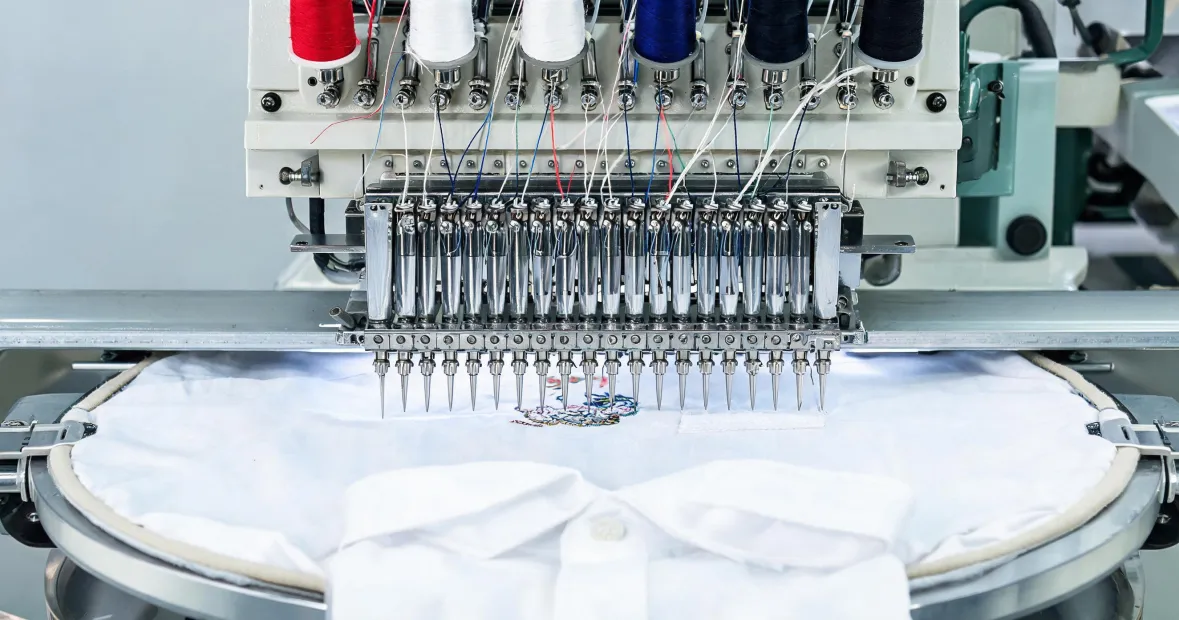
It started with a small thing. By the time we caught it, 212 shirts had been embroidered, and more than 40 had visible defects.
The First 200 Were Fine
I'm the quality/compliance manager at a contract embroidery shop. I review roughly 400 batches per year—or maybe 350, if it's a heavy summer and everyone's too busy to care about audits. That week, we were running 1,200 navy polo shirts for a regional hotel chain. The logo was a crest, about 3.5 inches wide, with six color changes. Our Tajima 15 needle embroidery machine had been producing them at about 750 stitches per minute. The first 200 pieces looked exactly like the approved sample.
That sample is still hanging in our sample closet, pinned with the date. I signed off on it at 3:15 pm the day before. The client approved it. Then production started, and for a while, everything was fine.
Then I saw the 213th.
The left edge of the crest was clean. The right edge was not. Thread breaks ran along the border, and the center column had shifted about 2 mm. On a chest logo, 2 mm is the difference between 'crisp' and 'cheap.' The client didn't ask for absolute perfection. But they did ask for consistency.
I pulled the shirt and set it aside. Then the next. Same shift. And the next.
The Setup Problem I Should Have Caught
Before I get to the reset, I need to explain how we got there. The sales team had promised the client 'high density, premium embroidery.' In my head, that meant 65,000 stitches, stable satin columns, and clean underlay. The digitizer heard 'maximum density' and produced a file at 88,000 stitches. The first article looked like a raised patch that pulled the placket fabric. We both said 'dense' but we meant different things. I said 'as dense as it needs to be to cover navy fabric.' They heard 'cram as many stitches as possible.' We discovered the mismatch when the first article came off the hoop with that stiff, bumpy feel.
I should have stopped the run there. I didn't. I assumed the slight distortion was the fabric, not the file. That was my first mistake.
What Actually Broke
After the first hour, the problem shifted. It wasn't the density anymore; it was registration. The machine began dropping stitches on one needle and leaving a visible offset after color changes.
Everyone had a theory. Tension. Bobbin. Needle alignment. Rotary hook. We rethreaded needle 12, changed the bobbin, cleaned the hook, and tightened the frame screw. On a modern embroidery machine, though, all that treats the symptom, not the cause.
Then the operator said, 'Maybe we need to reset the machine.' I said, 'Do it.' He heard, 'Reset the design file.' Not the same thing. By the time I noticed the mistake, 60 more pieces had gone through with the same problem.
This is where the phrase 'how to reset Tajima embroidery machine' becomes more urgent than it sounds. On a Servis sewing machine, the kind I grew up with, there's a sewing machine foot D attachment and a few tension dials, and that's it. You can fix most issues with a screwdriver and patience. A Tajima 15 needle embroidery machine is a different animal. It has fifteen needles, independent thread paths, a servo motor, and a computer that remembers its home position. If that home position drifts, the machine doesn't always tell you. It just sews a little less accurately each time it changes color.
The Reset That Didn't Work
We tried the obvious first. I turned the power off at the main switch, waited ten seconds, and turned it back on. The screen loaded, the needles returned to home, and the machine looked fine. Then we sewed a test piece, and the offset was still there.
Why? Because a power cycle is not an origin reset. The machine went back to the same stored origin it had been using—and that origin had drifted.
The most frustrating part of the whole episode: after the third failed test piece, the operator looked at me and asked if I wanted to reload the pattern from the USB. I said no, I wanted to reset the actual machine. He said, 'Which reset?' That's when I realized we'd been using the same word all morning but meaning different things.
Never expected a two-minute reset to solve something that tension adjustments couldn't. Turns out, when a machine has a computer, the fix is often a computer-level one.
The Reset That Finally Worked
On our Tajima, the effective reset was an origin point return, not a factory reset. You can find it under the maintenance menu on newer models, or through a physical key on older panels. The exact location varies, so if you're looking for 'how to reset Tajima embroidery machine' for your specific model, check the manual or the help screen. The steps that worked for us:
- Save the current pattern to a USB drive. This is just a precaution; an origin reset doesn't clear stored designs.
- Turn off the main power and wait 60 seconds. This lets the control board discharge, so the machine doesn't boot with old position data.
- Turn the power back on while holding the ORIGIN key on the operation panel. Hold it until the needle bars start moving toward their home position.
- Let the machine finish. The screen should show 'Origin Completed' or similar confirmation.
- Run a test file at low speed first. Compare it against the approved sample under daylight. Then run it at production speed and look for the same offset.
That was it. The surprise wasn't that the reset was complicated—it was that we had already done a power cycle and called it a reset. The machine had a consistent 2 mm offset stored in its home position, and no amount of tension adjustment was going to fix that.
On a Tajima 15 needle embroidery machine, the origin reset takes about two minutes. It saved us hours of mechanical adjustments and a warehouse full of possibly bad shirts.
Why I Keep Going Back to Those 212 Shirts
We ended up sorting out 41 pieces and re-embroidering them. The client never saw a defective shirt. We met the deadline—barely. But that batch cost us about $480 in rework, including test shirts and operator overtime. Actually, when I count the lost production time and the extra color-change test on the 15-needle machine, it was closer to $700.
The lesson I carry from the incident is not about the reset. It's about quality and brand perception. If that order had shipped with the last 200 logos still off by 2 mm, the hotel would not have said, 'The embroidery machine drifted.' They would have said, 'This looks unprofessional.' That feeling would have stuck. It would have cost us the account, and likely a few other accounts down the road.
I've learned to treat output quality as a brand extension. When a client gives us a Pantone color, I use the Pantone color bridge as a starting point and then sew a physical thread sample on the actual fabric. I don't trust a photograph or a phone screen. If the color is off by even a tiny amount, someone will notice. Not a professional—a normal person. And normal people define a brand by what they see.
I also run a quick blind check on every major order: I place the first article, a middle article, and the last article side by side on the same table, under the same light. If I can't tell which is which, the batch is good. If I can, the client will too.
The Lesson
Quality isn't about buying the most expensive machine, or having the fanciest software. It's about boring consistency: checking the first article, the last article, and a sample in between. It's about confirming we both mean the same thing when someone says 'reset the machine.' It's about knowing your machine's origin point and protecting it.
Since that run, I've scheduled an origin verification every quarter. We also do a 30-second alignment test at the start of every large order. It costs maybe two shirts' worth of thread. The alternative is a 1,200-piece job where the first logo doesn't match the last, and a customer who decides you're not the right vendor.
If you run a Tajima—or any multi-needle embroidery machine—learn how to reset it before you need to. Save the manual, take a video of the process, and train at least two people on it. Because when a logo starts walking across the chest, you don't need a hero. You need someone who knows how to get back to the origin.

Leave a reply