-
Who this checklist is for
-
Step 1: Lock the machine model and hoop compatibility
-
Step 2: Rescue the artwork—especially if it's a Tajima logo or fine detail
-
Step 3: Decide whether you actually need an HD embroidery machine
-
Step 4: Build a backup plan without pretending all machines are equal
-
Step 5: Check spare parts, cooling, and thread path before you promise anything
-
Step 6: Run a 10-minute preflight on the actual garment
-
Step 7: Ship and communicate like the deadline is already late
-
Common mistakes (and a note for small orders)
Who this checklist is for
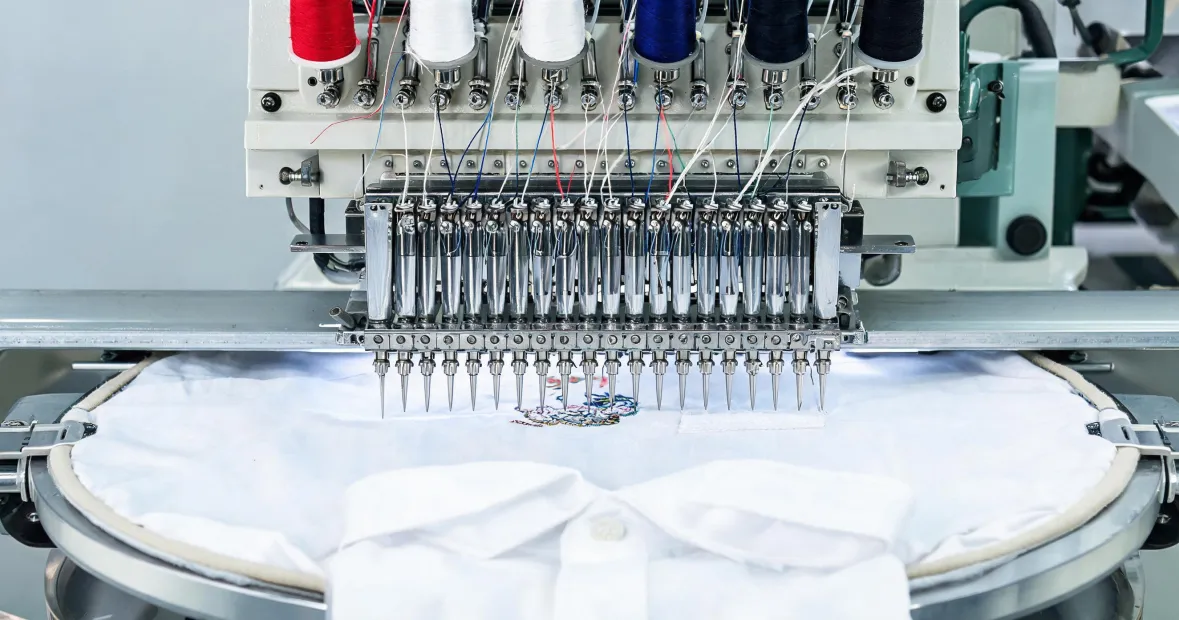
I coordinate rush embroidery production for a contract apparel decorator. I've handled 120+ rush orders in 9 years, including same-day turnarounds for promotional product clients. This checklist is for the moment a client calls at 4:30 p.m. and needs embroidered jackets, hats, or patches shipped by tomorrow. It assumes you're running a Tajima machine, or you're trying to decide if a backup like a servis sewing machine or a Poolin EOC03RE embroidery machine can save the job.
There are 7 steps. Total time to run them: about 45 minutes if you're organized. If you're not organized, you'll lose a day.
In March 2024, 36 hours before a trade show, a client needed 80 embroidered polos with a Tajima logo on the left chest. Normal turnaround was 5 days. We found the right magnetic hoops for Tajima embroidery machine setup, ran two samples, paid $420 extra in overnight shipping, and delivered with 4 hours to spare. Missing that deadline would've meant a $7,500 penalty clause.
Step 1: Lock the machine model and hoop compatibility
Don't assume every Tajima uses the same hoop. Magnetic hoops for Tajima embroidery machine setups are not universal. Magnet strength, hoop height, and mounting brackets vary by model and field size. I once watched a rush job stall because the shop ordered a hoop that fit a single-head Tajima but not the 12-head machine they actually needed.
What to do:
- Write down the exact Tajima model and head count.
- Confirm the hoop's inner dimensions against the decoration area.
- Test the magnetic hoop on the actual machine before you promise the client anything.
- Check whether the hoop needs a mounting bracket or adapter.
That last point is the one most people skip. It's also the one that kills deadlines.
Step 2: Rescue the artwork—especially if it's a Tajima logo or fine detail
If the file is a Tajima logo patch, a brand mark, or small text, don't just open it and hit start. Bad digitizing shows up faster on a rush job because you don't have time to redo 80 pieces.
I'm not a digitizer, so I can't tell you how to manually adjust every stitch path. What I can tell you from a production perspective is to check three things:
- Minimum text height. If the letters are under 0.2 inch, they'll likely fill in.
- Color sequence. Fewer thread changes means faster production.
- Pull compensation. Tight fabrics and caps need different settings.
Honestly, if the artwork is a mess and the deadline is tight, say so early. A 15-minute conversation beats a ruined run of 100 hats.
Step 3: Decide whether you actually need an HD embroidery machine
An HD embroidery machine gives you finer detail for small logos, gradients, and dense designs. But it won't fix bad digitizing, and it won't make a 48-hour deadline easier if your operator has never run that mode.
Use an HD embroidery machine when:
- The design has small lettering or detailed mascots.
- The client is paying for premium retail-quality decoration.
- You have a trained operator available for the full shift.
Skip it when the design is a simple 2-color block logo. Basically, match the machine to the job—not to the brochure.
Step 4: Build a backup plan without pretending all machines are equal
Sometimes the Tajima is down, or the job is too big for one machine. That's when people start asking about a servis sewing machine or a Poolin EOC03RE embroidery machine.
Let's be clear: a servis sewing machine is not a direct replacement for a commercial embroidery machine. It can sew seams, hems, or basic construction. It won't produce embroidery. If a vendor tells you otherwise, walk away.
A Poolin EOC03RE embroidery machine might work as a backup for certain runs, but verify file compatibility, hoop sizes, and local support before it touches a deadline job. I still kick myself for not documenting a vendor's verbal promise about a Poolin EOC03RE delivery window. We lost a day waiting for a machine that arrived with the wrong voltage.
My experience is based on about 200 mid-volume rush jobs. If you're running a single-head startup, your backup math will be different.
Step 5: Check spare parts, cooling, and thread path before you promise anything
Rush jobs expose weak maintenance. Before you start, do a 10-minute preflight:
- Needles: at least two spare packs in the sizes you need.
- Bobbin cases and bobbins: enough for the full run.
- Cooling system: clean filters, no odd noises, proper airflow.
- Thread path: no frayed spots, no mismatched thread weights.
- Trimmers and sensors: test them on a scrap piece.
I don't guess. I do not promise a deadline until the first sample is off the machine and checked. That's been my experience with deadline-critical apparel jobs.
Step 6: Run a 10-minute preflight on the actual garment
Don't test on a random scrap that's a different weight, color, or stretch. Test on the actual garment or the closest match. For caps, test on the same cap style. For performance wear, test on the same fabric blend.
Check:
- Registration. Does the design line up with the seam or pocket?
- Puckering. Does the fabric pull around the stitches?
- Backing. Is the stabilizer holding without showing through?
- Final look. Would you pay full price for this?
If the answer to the last question is no, stop. Fix it now. A rush fee doesn't buy you the right to ship ugly work.
Step 7: Ship and communicate like the deadline is already late
Production is only half the job. Shipping and updates are the other half.
According to USPS Business Mail 101 (as of January 2025), a large envelope max thickness is 0.75 inch. If you're mailing a folded sample with a magnetic hoop ring, don't assume it ships as a flat. Check dimensions before you promise next-day delivery.
Also, watch your vendor claims. Per FTC advertising guidance (ftc.gov), claims like 'zero downtime' need evidence. If a supplier promises guaranteed same-day service during a rush, ask for the data. You don't want to bet a client's event on a slogan.
Send tracking. Send photos. Send a backup plan in writing. The client isn't just buying embroidery—they're buying certainty.
Common mistakes (and a note for small orders)
The biggest mistake is treating a small order like it doesn't matter. I've seen shops push a 12-piece order to the back of the queue and then lose a 1,200-piece contract six months later. That $300 sample order from a new apparel decorator? Treat it like the $15,000 order it might become.
Small doesn't mean unimportant—it means potential. At the same time, don't pretend small runs get the same unit price as 10,000-piece runs. That's just math. The point is service, not fantasy pricing.
Other mistakes:
- Promising a deadline before testing the hoop and artwork.
- Using a servis sewing machine as an embroidery backup.
- Assuming every Poolin EOC03RE embroidery machine has the same support in every region.
- Skipping the cooling system check because 'it was fine last week.'
- Not writing down verbal vendor commitments.
I'm not a Tajima service engineer, so I can't speak to hook timing or board-level repairs. What I can tell you is this: in a rush, discipline beats hope. Run the checklist, document the promises, and protect the small client who might become your biggest one.
Leave a reply