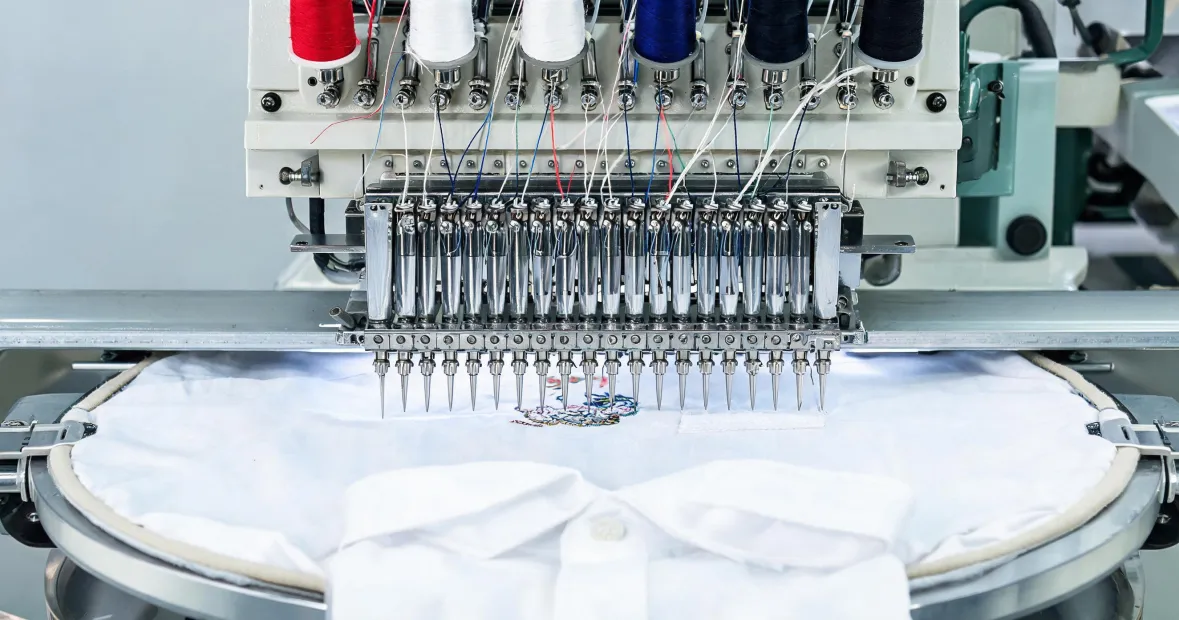
I'm the office administrator at a contract embroidery shop — the person who places the orders, from thread and backing to the occasional five-figure machine purchase. For the past five years, I've managed roughly $400K in annual purchasing across about fifteen vendors, and I report to both operations and finance. That means I don't just see the invoice. I see the setup hours, the support calls, the training time, and the "why didn't anybody flag this" moments.
So when my boss says "we need a Tajima," I know what he's actually asking: which one, and why? The honest answer is, it depends on where your production actually is.
There's no single best Tajima embroidery machine. There's the right machine for your situation, and there's the expensive lesson. From the outside, it looks like a Tajima is a Tajima — same brand, same logo, same general promise. The reality is a lineup that spans entry-level single-head machines to 20-head production systems, flatbed and tubular, standard and bead/sequin configurations. The machine that's perfect for a four-person shop doing corporate logos would be a bottleneck for a factory running beaded embroidery contracts.
I'll break this down into three scenarios. Read the one that matches where you are — not where you wish you were. If you're unsure, I've included a self-assessment at the end.
Scenario A: You're buying your first commercial machine
This is the most exciting stage, and honestly the most dangerous one. You've outgrown the home machine, everything at the dealer looks capable, and the demo runs flawlessly. It's tempting to buy capacity you can't fill.
Start small. A compact single-head or two-head machine is enough to learn the production side, validate demand, and build a customer base. A six-head machine sounds like six times the output — but if you don't have the orders to keep it running, you're paying for capacity and maintenance you don't need.
Get familiar with the tajima embroidery machine manual — actually familiar, not just "we have a PDF somewhere." The manual has the setup diagrams, the tension charts, the sewing machine synchronizer specifications, and the serial plate layout. It also has the troubleshooting flowcharts, which is where the time gets saved. I've watched production staff spend half a day fighting thread tension when the answer was diagrammed on page 42. (I really should make a "check the manual first" poster. It would save us actual money.)
Verify the tajima logo and serial number before you wire a deposit. Per FTC advertising guidelines (ftc.gov), any dealer claiming to sell new, authorized Tajima equipment must be able to substantiate that claim. Not every reseller does. Ask for a photo of the serial plate. Run it past Tajima support. And if a dealer "can't find" the warranty registration paperwork, treat that as a red flag, not a minor inconvenience. We learned this one the hard way — I'll skip the full story, but it took four months to get our money back after a "factory direct" machine turned out to be a reconditioned unit.
Scenario B: You're scaling from two machines to five or more
This is where growing shops make the most expensive mistake, and it's not the mistake you'd expect. People assume the path to more output is a bigger machine with more heads. That's not always true. The path to more output is removing the actual bottleneck — and if you haven't identified it, more heads just means a bigger bottleneck.
Before adding capacity, check the machines you already have. The sewing machine synchronizer — the component that coordinates needle timing with the hook — is the source of a surprising number of "stitch quality" complaints. I've seen a shop replace needles, thread, and hoops over the course of a week while the real problem was a synchronizer that had drifted out of adjustment. On a used machine, ask to see the synchronizer function demonstrated. On a new machine, make sure operator training covers how to check sync before troubleshooting anything else. (Note to self: that story is now the E-1 example in our training binder.)
Match the bed type to your product mix. Flatbed machines handle flat garments well. Hats and caps need tubular capability. It seems basic — until a dealer shows you a "flexible" option that does neither particularly well.
And if your orders include bead work, don't try to retrofit your way there. A beaded embroidery machine is a specific configuration: bead attachment, clearance, and a thread path that keeps beads feeding consistently. Tajima builds these, but they're not an afterthought add-on to a standard flatbed. If beaded contracts are trending in your pipeline, spec it from the start.
Scenario C: You're high-volume, specialized, or planning to be
If your machines are running 60+ hours a week, or you're bidding on contracts that demand specialized output, the buying logic changes. You're not shopping for a machine anymore — you're shopping for uptime.
When we evaluated the Creator for our high-volume contracts, the quote gave me real hesitation. The Creator embroidery machine price varies a lot by configuration — head count, bed type, and attachments all move the number — and even our baseline estimate was steep. But when I ran a three-year total cost projection covering purchase, scheduled maintenance, expected downtime, and resale, the Creator came out ahead of the alternatives on cost per stitched piece. People assume a higher price means better quality. Actually, it runs the other way: machines that sustain uptime carry higher prices because they're worth more to shops that measure cost per piece.
Had two weeks to finalize the machine spec before a big contract kickoff. Normally I'd run test hoops with our actual designs and visit a showroom floor. There was no time, so I went with a spec sheet comparison and an extended support call. In hindsight, I should have pushed the timeline — the machine performed fine, but we spent the first two weeks dialing in settings a test run would have caught. (Thankfully, it didn't cost us the contract. It cost us some sleep.)
Training and support matter more than the brochure at this stage. Tajima's safety training materials are genuinely good — not the "watch this and sign a form" kind, but the kind that teaches habits. I used to file that in the nice-to-have drawer. After auditing our incident reports for a 2024 vendor consolidation project, I stopped skipping it. The fundamentals of embroidery haven't changed — needles, thread, tension, timing. But the execution layer has: diagnostics, software updates, structured operator training. What was acceptable dealer support in 2020 doesn't cut it in 2025.
And negotiate the maintenance program, not just the machine. Scheduled maintenance is where cost control actually happens. A machine on a preventive plan has a very different life arc from one that gets serviced "when it acts up."
How to tell which scenario you're actually in
If you read all three and found yourself in two of them, you're normal. Here's the test I use when our own team can't agree:
- Hours per week. Under 30 hours of machine time → Scenario A. 30 to 60 → Scenario B. Over 60 → Scenario C.
- Most common job type. Flat garment logo work → a flatbed will serve you well. Hats and caps → tubular capability is non-negotiable. Beaded or sequin work → spec the specialized configuration from day one.
- Biggest current pain. Stitch quality issues? Check the sewing machine synchronizer before blaming the machine. Changeovers eating your day? More heads won't solve it. Downtime during contracts → you're in Scenario C territory; support and maintenance are the priority.
One last thing. If you're torn between two scenarios, buy for the one you'll be in eighteen months from now — not the one you're in today. When I took over purchasing in 2020, we bought for the shop we were, not the shop we became. That machine ran at half capacity for two years while contracts went to a bigger machine down the street. It looked conservative on paper. In practice, it was the opposite. Timing matters in this business, and I do not mean the synchronizer timing. I mean the timing of your investment decision.

Leave a reply